Verizon Jetpack® MiFi® 7730L - Restore Settings to Factory Defaults
Here's how to reset your MiFi 7730L if it won't connect, crashes/resets, freezes or runs slowly.
Restore Settings to Factory Defaults only if absolutely necessary as it removes all modified settings including Network Name (SSID), Wi-Fi/Admin Password, etc.
Reset via Settings Menu (Preferred Method)
- From the Home screen, tapMenu(located in the lower-left).If necessary, press thePower button(located on the top-right edge) to turn on the display.
- TapSettings.
- TapFactory Reset.
- TapFactory Resetagain.
- To continue, review the disclaimer then tapConfirm.Allow several minutes for the reset process to complete.After restoring to factory defaults, ensure Power Management Settings are set to the preferred options.
Button Reset
- Remove the battery cover then, with the device powered on, press the Reset button (using a paperclip or similar tool) for 10 seconds or until "MiFi resetting" appears on the display.
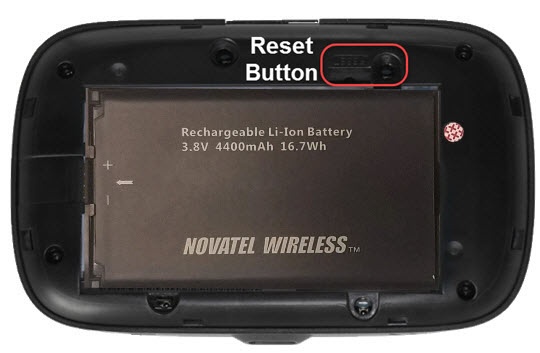
Admin Site Reset
- Access the Admin Web Interface.
- From the Jetpack tab, clickBackup and Restore(below the Jetpack tab, to the right).
- From the Restore to Factory Defaults section, clickRestore Factory Defaults.
- To continue, review the info then clickConfirm.Allow several minutes for the restore process to complete.After restoring to factory defaults, ensure Power Management Settings are set to the preferred options.