Verizon Jetpack®MiFi® 7730L - Charging Options
Here's how to identify ports and view the charging status of your Verizon Jetpack MiFi 7730L.
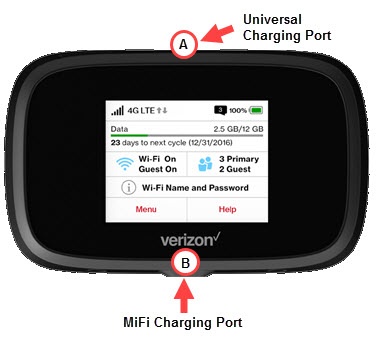
This device has 2 USB ports:
- The Universal Charging Port (located above the display) is only used to charge another device (e.g., smartphone, battery pack, etc.).
- The MiFi Charging Port (located below the Verizon logo) should be used to charge the Jetpack, internet tethering and file sharing.
- Plug a charger into the applicable port.
- View the charging indicator on the display:If no charge is detected, ensure the charger is connected securely to the correct port and power outlet.Battery Charge IndictatorDisplays remaining power. No charge detected.Battery AC Charging IndicatorDisplays when the Jetpack is connected to the AC (wall) connector and receiving a charge.Battery USB Charging IndicatorDisplays when another device getting a charge while connected to the Jetpack via USB cable.