Verizon Jetpack® 4G LTE Mobile Hotspot MiFi® 6620L - Charging Options
If you're having power or charging issues with your MiFi 6620L, view this.
 Please refer to the MiFi 6620L user guide for more info on power settings.
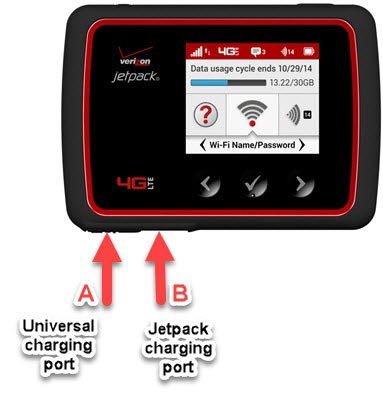
This device has 2 USB ports (see image below):
- Universal Charging Port (A)Used to charge an additional wireless device.
- Jetpack charging port (B)Used to charge the MiFi device. To charge the MiFi:
- Connect to wall charger (AC).
- Review battery charging icon as shown in chart below.Battery Charge IndictatorDisplays remaining power.Battery AC Charging IndicatorDisplays when the jetpack is connected to the AC (wall) connector.Battery USB Charging IndicatorDisplays when another device is connected to the jetpack and charging via USB cable.