Push to Talk Plus - Dispatch Console - Place a Group Call
Here's how to place a group call via the Push to Talk Plus Dispatch Console.
- Launch the Dispatch Console.Navigate:Start>Apps>Dispatch Console menu.
- Do one of the following:
- To place a Quick Group call:
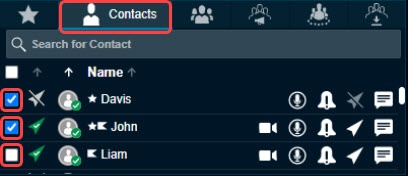
- Click theContacts tabthen select (check) the desired contacts.
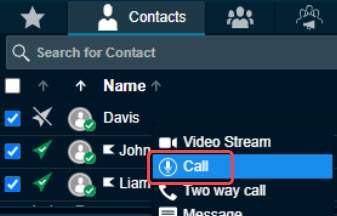
- Right-click a contact then clickCallicon to the right of the appropriate group.The 'Master Call Activity' window displays the contact and changes to a 'Call Ready' state.
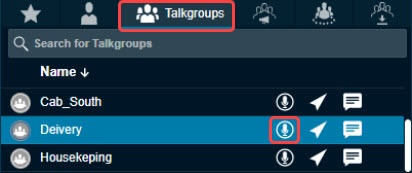
- To place a talkgroup call, select theTalkgroups tabthen click theCall iconto the right of the appropriate contact.The 'Master Call Activity' window displays the contact and changes to a 'Call Ready' state.
- To talk, click and hold theCall icon. Release the icon to allow others to speak.The Call icon turns blue
while your voice is transmitted.