Samsung Galaxy Note8 - Remove or Insert the S Pen™
Here's how to insert and remove the S Pen from your Galaxy Note8.
The S Pen is a stylus that assists you in performing different functions on the Note8. The S Pen stores inside the device for convenient access. Proper removal and insertion is imperative to not damage the device. See below for proper removal and insertion of S Pen.
Remove the S Pen
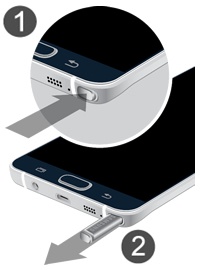
- From the bottom edge of the device, press in on the S Pen to unlock (figure 1) then pull outward using the notch on the end (figure 2).For the device to recognize the removal of the S Pen, ensure S Pen sound and/or S Pen vibration is turned on
. If necessary, swipe up or down from the center of the display then navigate: .
The image below is an example.
Insert the S Pen
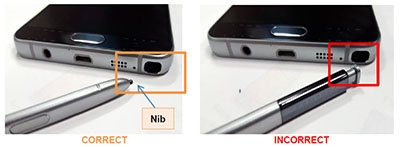
Inserting incorrectly may damage the pen and your smartphone.
- With the nib (tip) pointing inward, insert the S pen into the storage compartment located on the bottom edge of the device.Press in on the S Pen to lock it into place.The image below is an example.