Kyocera DuraXV LTE - Insert / Remove SIM Card
Here's how to properly insert or remove a SIM card for your DuraXV LTE.
Instructions on inserting / removing your SIM can help with activation issues / errors, browser connection problems and a blank or frozen screen.
Don't attempt to insert/remove the SIM card while the device is powered on. Doing so may harm the SIM card and/or the device.
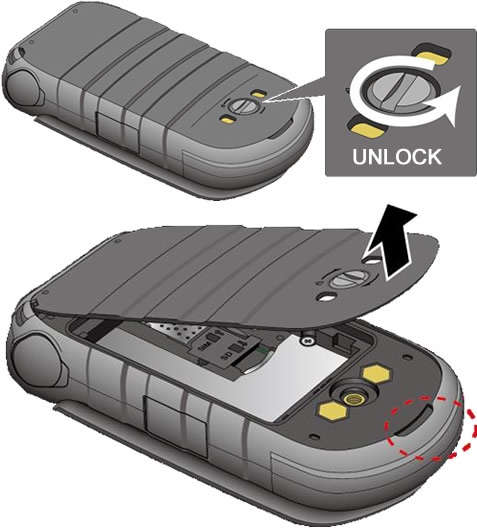
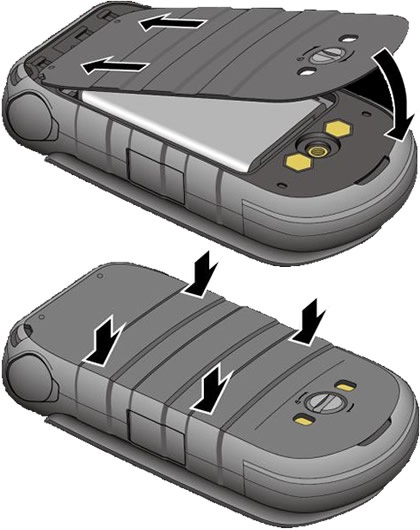
- Unscrew (turn counterclockwise) then remove the battery cover.
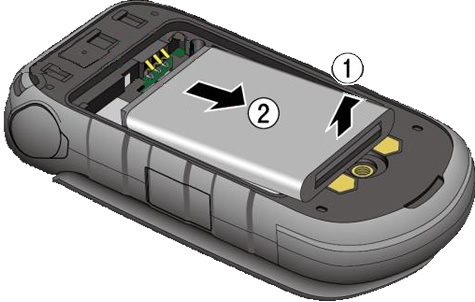
- Lift then remove the battery.
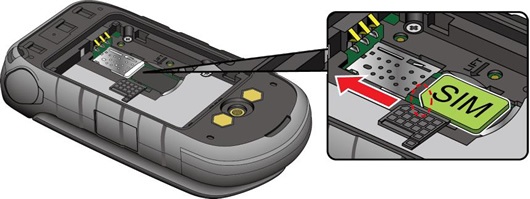
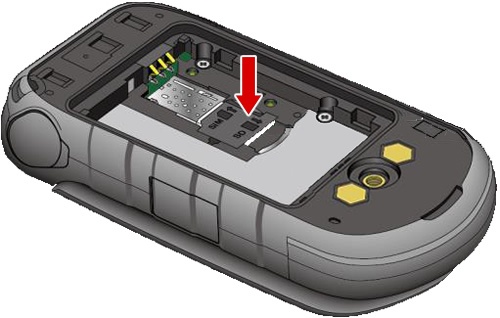
- Lift card protection flap.
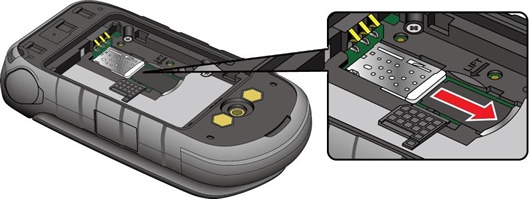
- Then do one of the following:
- Insert SIM cardEnsure gold contacts face down.
- Remove SIM cardPress the SIM card in, release it then remove the SIM card.
- Place the card protection flap back in place.
- Insert the battery.Ensure the gold contacts line up then press down gently to secure.
- Replace the back cover over on the back of the phone, press down along the edges then screw it in place (turn clockwise) to secure.