Session status messages
Session Status

Due to inactivity, your session will end in approximately 2 minutes. Extend your session by clicking OK below.

Due to inactivity, your session has expired. Please sign in again to continue.

Kyocera DuraXV LTE - Insert / Remove Battery

2026-10-14 02:25:29.095

Kyocera DuraXV LTE - Insert / Remove Battery

Here's how to insert / remove the battery for your DuraXV LTE.
  1. Ensure the device is powered off.
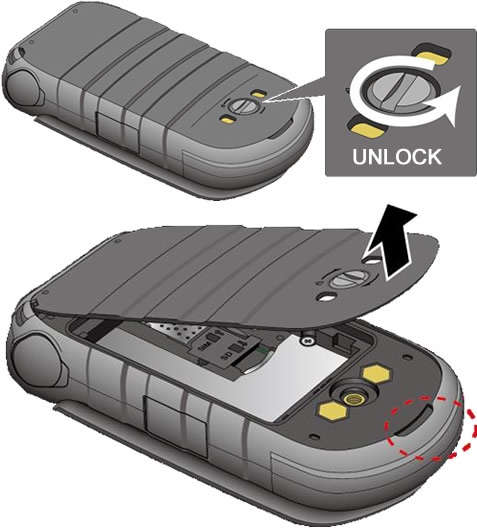
  2. Unscrew (turn counterclockwise) then remove the battery cover.
    Remove the Back Cover
  3. Do one of the following:
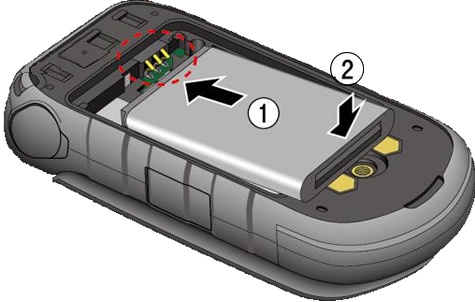
    • Insert battery
      Align the contacts on the battery with the contacts on the phone.
      Insert the Battery
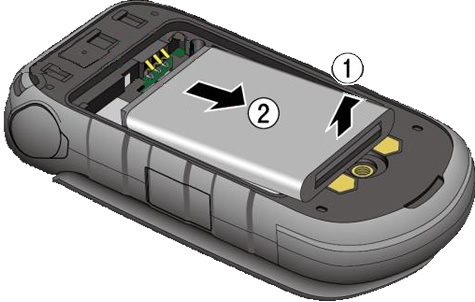
    • Remove battery
      Remove the Battery
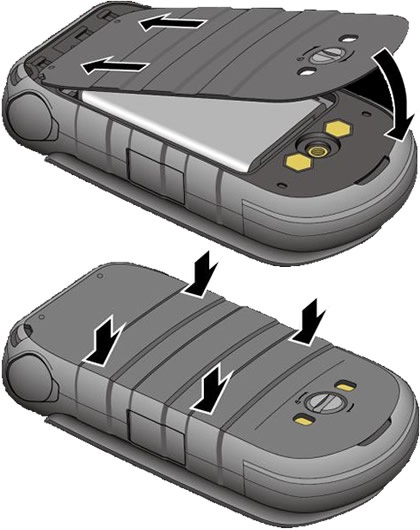
  4. Replace the back cover then press down along the edges.
    Replace the Back Cover
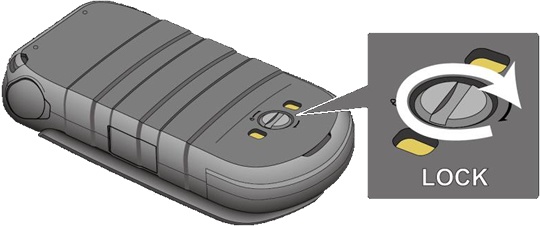
  5. Turn the screw (turn clockwise) to secure the cover in place.
    Turn the Screw to Lock the Cover