Push to Talk Plus - Kyocera DuraXV LTE - Instant Personal Alerts
Here's how to send an alert to a Push to Talk Plus contact on your DuraXV LTE.
An Instant Personal Alert (IPA):
- is a call alert that can only be sent to another PTT+ contact who's on the same Verizon network as the sender.Alerts must be enabled and can be sent only to individual contacts, not groups.
- can only be sent when the sender's presence status is "Available."
Sending an Alert
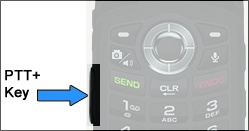
- Press thePTT+ key(located on the left side of the phone).
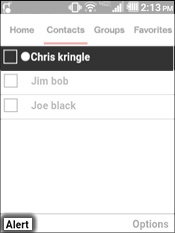
- From the Contacts tab, highlight the appropriate contact then press theleft soft keyto choose Alert.
Receiving an Alert
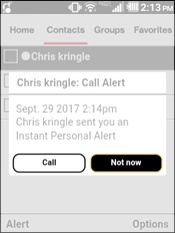
- When receiving an IPA, from the alert message select Call or Not now.