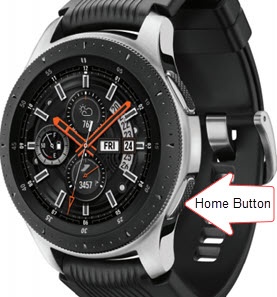
Samsung Galaxy Watch - Restart / Soft Reset
A soft reset can resolve several issues (e.g., resetting, freezing, etc.) on your Galaxy Watch.
A soft reset can resolve issues like continuous resetting, rebooting, device crashing, freezing, won't ring or vibrate, can't make or receive calls, device locks up and screen doesn't respond.
- From your Android™ smartphone or Apple® iPhone® , ensure your Galaxy Watch software is up to date as the steps below apply to the most recent version.
- A soft reset (turning the device off then back on) is similar to restarting a desktop computer and is one of the first steps in troubleshooting a device. In most cases, a soft reset won't affect data on the device unless the battery is very low.
- For additional info and a Galaxy Watch simulator, visit the Samsung support site.
- From the watch screen, press theHome buttonuntil the options menu appears, then release.
- From the options screen, tapPower off.
- Once the device is off, press and hold thePower buttonuntil the Samsung Galaxy Watch logo appears, then release.