Samsung Galaxy Watch - View Text Messages
Here's how to view text messages from your Galaxy Watch.
- From your Android™ smartphone or Apple® iPhone® , ensure your Galaxy Watch software is up to date as the steps below apply to the most recent version.
- This watch doesn't have the ability to send/receive iMessages®. If you're using an Apple iPhone with this watch, disable iMessage to receive all text messages as SMS on your watch.
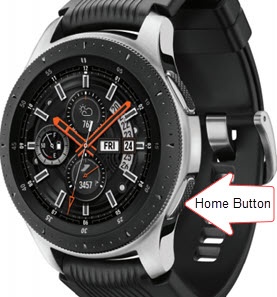
- From the watch screen, press theHome buttonto open the apps screen.
- Tap theMessages icon
.
- Turn the bezel to scroll through messages, then select the thread you wish to view.