Samsung Gear S3 frontier / Gear S3 classic - Manage Alerts / Notifications
Here's how to change the notification sound for incoming calls and/or messages on your Galaxy Watch.
View this info to change the notification sound for incoming calls and/or messages.
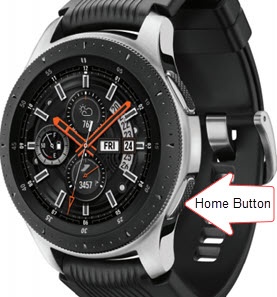
- From the watch screen, press theHome buttonto open the apps screen.
- TapSettings
.
- TapSound and vibration.
- TapRingtone.
- Select the preferred ringtone then tapOK.Selected when a Blue dot is present.
- TapNotification sound.
- Select the preferred notification type then tapOK.