KYOCERA DuraForce PRO 2 - Insert or Remove SD / Memory Card
Here's how to insert or remove an SD / memory card for your DuraForce PRO 2.
The DuraForce PRO 2 supports microSD memory cards which can be purchased from any Verizon store or online.
- Ensure the phone is powered off.
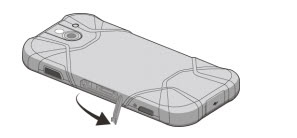
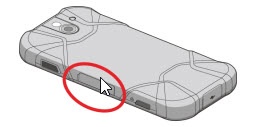
- On the left edge of the phone (display facing down), open the SIM / microSD card slot cover then remove the SIM / microSD card tray.
- Remove the tray by hooking your fingernail and pulling the top edge of the tray then do one of the following:
- Insert SD / memory cardPlace card into tray with gold contacts facing down.
- Remove SD / memory cardLift card from the tray.
- Slide the tray back into the SIM / microSD card slot.
- Close the SIM / microSD card slot cover.