moto g7 power - Common Camera Settings
Here's info on common camera settings (e.g., flash, timer, front / rear camera, etc.) for your moto g7 power.
For additional info on camera settings, refer to the 'Camera' section of the user guide.
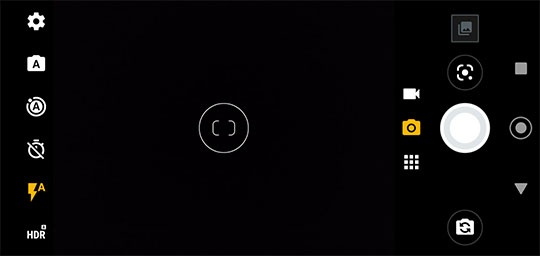
HDR
HDR (High Dynamic Range) combines photos or videos taken at different exposures for one optimal photo or video.
- From a Home screen, tap theCamera icon
.
- Tap theHDR icon
to select an option (on, off, auto).
Flash
- From a Home screen, tap theCamera icon
- Tap theFlash icon
to select an option (on, off, auto).
Timer
- From a Home screen, tap theCamera icon
- Tap theTimer icon
to select an option (off, 3 seconds, 10 seconds).
Active photos
- From a Home screen, tap theCamera icon
- Tap theActive photos icon
to select an option (on, off, auto).
Menu
- From a Home screen, tap theCamera icon
- Tap theMenu icon
to access these options:
- Portrait
- Spot color
- Cinemagraph
- Panorama
- Live filter
Video
- From a Home screen, tap theCamera icon
- Tap theVideo icon
then tap the
Menu icon- Slow motion
- Timelapse
- YouTube Live
- AR Stickers
Switch Camera
- From a Home screen, tap theCamera icon
- Tap theSwitch camera icon
to switch between front or rear camera.
Panorama
- From a Home screen, tap theCamera icon
- Tap theMenu iconPanorama Icon
to take a wide-angle shot.