Sonim XP8 - Check for Physical Damage
Here's how to check for physical damage on your Sonim XP8.
If damage is found:
- Sonim offers a 3-Year warranty on the XP8 device.
- The Sonim warranty (2 additional years post the Verizon Wireless warranty period):
- During year 1, Sonim refers the customer to Verizon Wireless for warranty issues.
- At the end of year 1, contact Sonim support for warranty issues.
- Sonim's 3-year warranty covers any damage e.g., cracked screens, water damage, physical damage etc.
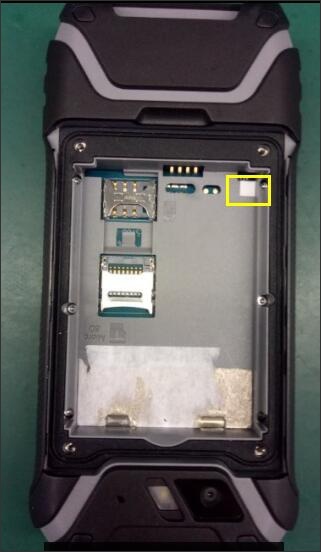
Water Damage Indicator - Phone
- The indicator is located in the battery tray:
- Liquid Damage Indicator (LDI) in white means normal condition.
- Liquid Damage Indicator (LDI) in red means liquid detected.
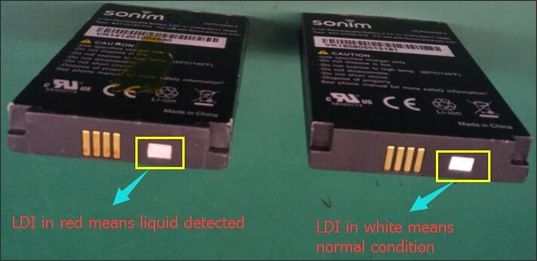
Water Damage Indicator - Battery
- The indicator is located on the battery:
- Liquid Damage Indicator (LDI) in white means normal condition.
- Liquid Damage Indicator (LDI) in red means liquid detected.