Sonim XP8 - Common Camera Settings
Here's info on common camera settings (e.g., flash, timer, front / rear camera, etc.) for your Sonim XP8.
If you need to adjust common camera settings (e.g., flash, timer, etc.) for your Sonim XP8® , follow these step-by-step instructions.
For additional camera settings, refer to the user guide.
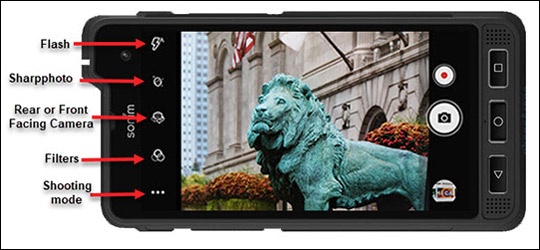
Shooting mode
- From a Home screen, tap theCamera icon
(lower-left).
- Tap theShooting mode icon.
- Tap any of the following:
- Auto
- HDR
- UbiFocus
- Portrait
- Landscape
- Sports
- Candlelight
- Sunset
- Night
- Beach
- Snow
- ChromaFlash
- BlurBuster
- SharpPhoto
- TrackingFocus
- Panorama
- ProMode
Filters
- From a Home screen, tap theCamera icon
- Tap theFilters icon.
- Tap any of the following:
- Aqua
- Posterize
- Solarize
- Solarize
- Negative
- Sepia
- Mono
- None
Rear or Front Facing Camera
- From a Home screen, tap theCamera icon
- Tap theCamera Facing iconto determine which camera to use (rear-facing camera or front-facing camera).
Sharpphoto
- From a Home screen, tap theCamera icon
- Tap theSharpphoto icon.
- Slide theblue dotleft or right to increase/decrease.
Flash
- From a Home screen, tap theCamera icon
- Tap theFlash iconto turn on or off.
Settings
- From a Home screen, tap theCamera icon
- Tap theMenu icon(upper right).
- Tap theSettings icon.
- Select an option:
- Store location
- Face Detection
- Stroage
- Record Date & Time
- Countdown timer
- Continuous Shot
- Picture size
- Picture quality
- Redeye Reduction
- Exposure
- White balance
- Shutter Sound
- ZSL
- Save the RAW format
- Video quality
- Video duration
- Images Stabilization
- Noise Reduction
- Video Encoder
- Audio Encoder
- Video Rotation
- Time lapse
- Video High FrameRate
- Restore defaults