Samsung Galaxy Watch - Turn Do Not Disturb On / Off
Here's how to check 'Do not disturb' settings if your Galaxy Watch isn't receiving calls or alerts for texts and email.
From your Android™ smartphone or Apple® iPhone® , ensure your Galaxy Watch software is up to date as the steps below apply to the most recent version.
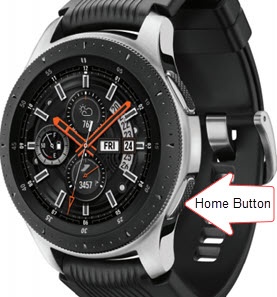
- From the watch screen, press theHome buttonto open the apps screen.
- TapSettings
.
- TapAdvanced.
- TapDo not disturb.
- Do one of the following:
- To enable / disable immediately, tapTurn on nowto turn on
or off
.
If turning on, select a duration (e.g., From now on, For 1 hour, for 2 hours, etc.) then tap thecheckmark icon.
- To turn Do not disturb on or off based on phone settings, tapSync Do not disturbthen tap theswitchto turn on or off.