Orbic® Journey™ V / Orbic Journey - View SIM Card Number
Here's how to view the SIM card number associated with your Journey V / Journey.
You can also remove the SIM card and view the 20-digit SIM card number (with the gold contacts facing away).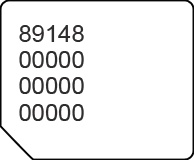
- From the main screen, selectMenu.Utilize the 5-way navigation pad to highlight and the center button to select.
- Navigate:Tools &SettingsSettings>About phone.
- SelectStatus.
- SelectICCIDthen view the 20-digit SIM card number.