Samsung Galaxy S20 FE 5G UW Insert or Remove SD / Memory Card
Samsung Galaxy S20 FE 5G UW
Insert or Remove SD / Memory CardSwitching to a new device, traveling or troubleshooting a connectivity issue? Learn how to quickly and easily insert or remove the SIM card for your Galaxy S20 FE 5G UW.
Before you begin
Ensure your Galaxy S20 FE 5G UW is powered off before inserting or removing an SD / memory card.
This device supports microSD (TransFlash) memory cards which can be purchased from any Verizon store or online. For best results, Samsung recommends using a class 10, UHS class 1, 3 or newer memory card.
The SD / memory card slot is on the opposite side of the tray from the SIM card.
Steps
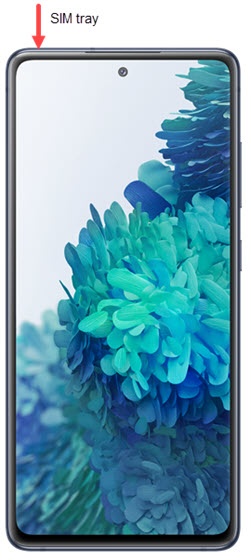
- From the top-left edge of the device with display facing up, use the insertion / removal tool (or a paperclip) to unlock the tray by inserting it into the provided slot, then remove the tray.
- Do one of the following:
- To insert an SD / memory card: With the gold contacts facing down, insert the SD / memory card into the tray.
- To remove an SD / memory card: From the bottom of the card, carefully lift to remove. To assist, use the opening on the opposite side of the tray to dislodge (using a fingernail or similar tool).
- Reinsert the card tray then press it in to lock it into place.