Verizon 5G Internet Gateway (LVSKIHP) Change Guest Wi-Fi Name / Password
Verizon 5G Internet Gateway (LVSKIHP)
Change Guest Wi-Fi Name / PasswordBacking up your configuration lets you quickly restore all your custom settings (e.g., network names, passwords, etc.) if you ever need to reset or replace your 5G Internet Gateway (LVSKIHP).
Before you begin
This content is for the 5G Internet Gateway (LVSKIHP). Refer to How to Identify Verizon 5G Home Equipment if you need to verify the model you're using.
If the Wi-Fi password is changed, the network settings on the computer must be updated. For assistance, refer to the applicable operating system Macintosh® OS X or Windows®.
Steps
- Sign in to the Admin WebGUI.
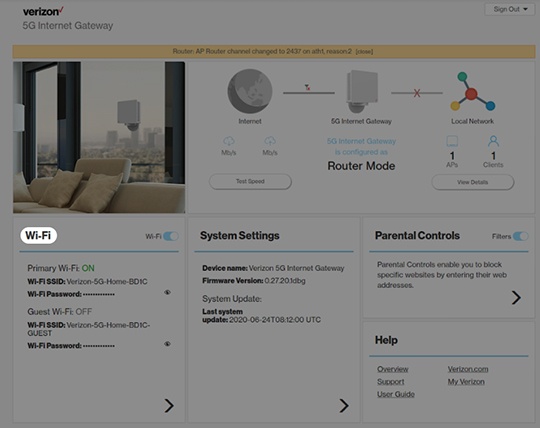
- From the Home screen, clickWi-Fi.
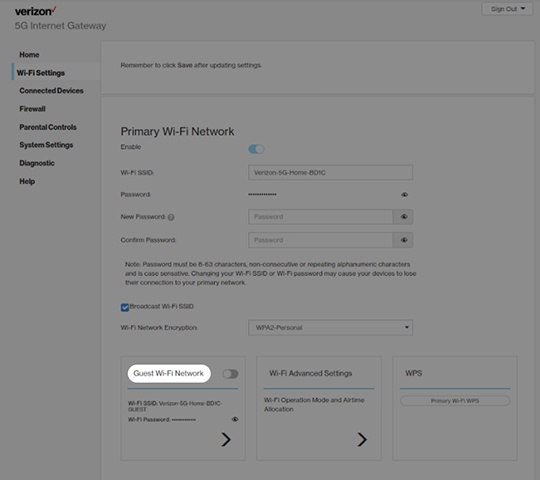
- From Wi-Fi Settings, click theGuest Wi-Fi Network switchto turn the guest network on or off.
- From Wi-Fi Settings, clickGuest Wi-Fi Network.
- Select any of the following to view or change security options:
- Enable
- Wi-Fi SSID (Name)
- PasswordPassword must be 8-28 characters and is case sensitive.
- Broadcast Wi-Fi Name (SSID)
- Wi-Fi network encryption (i.e., None, WPA-Personal, WPA2-Personal, WPA2/WPA3)
- ClickSave.