TCL TAB 8" - Common Camera Settings
Here's info on common camera settings (e.g., flash, timer, front / rear camera, etc.) for your TCL TAB 8.
For additional support, refer to the Camera section of the User Guide.
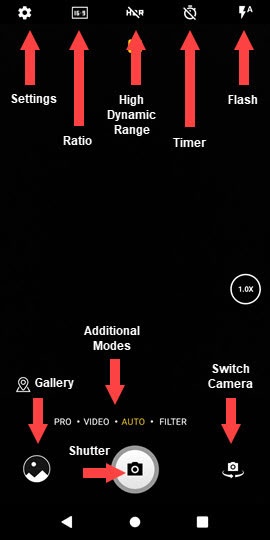
HDR (High Dynamic Range)
HDR (High Dynamic Range) - Combines photos or videos taken at different exposures for one optimal photo or video.
- From a Home screen, tap theCamera icon
.
If unavailable, swipe up to access all apps. - Tap theHDR iconto turn on or off.

Flash
- From a Home screen, tap theCamera iconIf unavailable, swipe up to access all apps.
- Tap theFlash icon.
- Select an option:
- Auto
- On
- Off

Timer
- From a Home screen, tap theCamera iconIf unavailable, swipe up to access all apps.
- Tap theTimer icon.
- Select an option:
- Timer off
- 2s (seconds)
- 5s (seconds)
- 8s (seconds)

Settings
- From a Home screen, tap theCamera iconIf unavailable, swipe up to access all apps.
- TapSettings icon(upper-left).
- Select an option then adjust as preferred:
- Photo size
- Video quality
- Volume button function
- Touch to capture
- Grid
- Storage
- Save location information
- Shutter sound
- Reset settings

Additional Modes
- From a Home screen, tap theCamera iconIf unavailable, swipe up to access all apps.
- Select an option:
- VIDEO
- AUTO
- FILTER
- PANO
- STOP MOTION
Rear or Front Facing Camera
- From a Home screen, tap theCamera iconIf unavailable, swipe up to access all apps.
- Tap theCamera Facing iconto switch between rear and front-facing camera.
