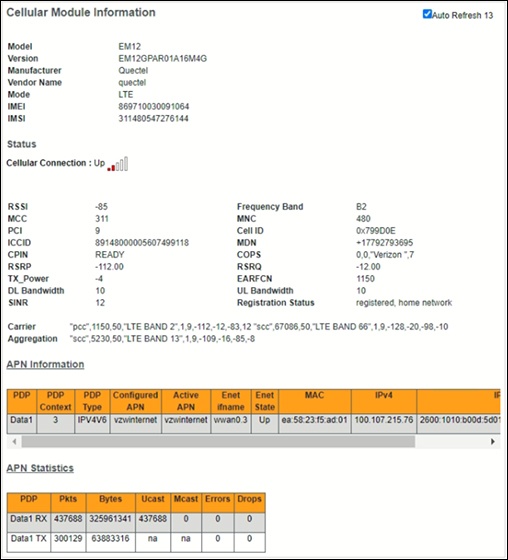
Arris NVG558 Router - Cellular Statistics / IMEI / ICCID / Signal
Here's how to view the cellular statistics for your NVG558 router.
- Sign in to the Admin WebGUI.You must be connected to the network to access the admin page.
- Click theCellular tabto access the Cellular links bar.This tab will display the statistics, status, and current parameter settings of the cellular connection.
- The Cellular Statics page displays the following information:
- Module:
- Model: Indicates the Cellular modem model number.
- Version: Indicates the version of the Cellular module.
- Manufacturer: Indicates the cellular modem manufacturer.
- Vendor: Indicates cellular module Vendor.
- IMEI: International Mobile Equipment Identity.
- IMSI: International Mobile Subscriber Identity.
- Status:
- Cellular Connection: Indicates the current state of the cellular data connection, up or down.
- RSSI: Received Signal Strength Indication.
- Frequency Band: Indicates the current frequency band of the cellular module.
- MCC: Mobile Country Code.
- PCI: Physical Cell ID.
- Cell ID: Indicates the Cell Identifier.
- ICCID: Integrated circuit card identifier - it is a unique number identifying the SIM card.
- MDN: Mobile Directory Number.
- CPIN: Indicates the SIM readiness. "READY" indicates that it's ready for operation.
- COPS: Current network operator.
- RSRP: Reference Signal Received Power.
- RSRQ: Reference Signal Received Quality.
- TX_Power: Indicates the transmission power.
- EARFCN: Indicates the E-UTRA Absolute Radio Frequency Channel Number.
- DL Bandwidth: Indicates the Downlink Bandwidth.
- UL Bandwidth: Indicates the Uplink Bandwidth.
- SINR: Signal-to-Noise ratio in decibels.
- Registration Status: Indicates the Registration status.