Arris NVG558 Router - Firewall - Packet Filter
Here's how to configure the packet filter portion of the firewall on your NVG558 router.
- Sign in to the Admin WebGUI then clickFirewall.You must be connected to the network to access the admin page.
- ClickPacket Filter.
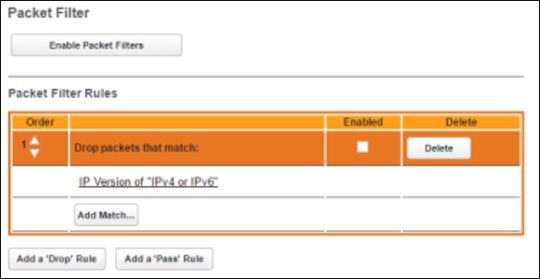
- Configure the following:
- Enable Packet Filters: Click to enable packet filtering. When enabled, this button becomes Disable Packet Filters.
- Add Match: Click to enter the source or destination IP address the filter matches. Before using this button, use one of the following two.
- Add a 'Drop' Rule: Click to add a rule that drops packets matching the filter.
- Add a 'Pass' Rule: Click to add a rule that forwards packets matching the filter.