Arris NVG558 Router - Firewall - Status / Level
Here's how to view the firewall status / level on your NVG558 router.
Status
- Sign in to the Admin WebGUI then clickFirewall.You must be connected to the network to access the admin page.
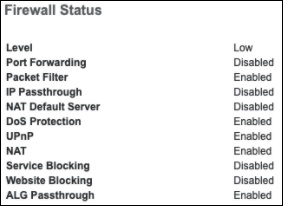
- ClickStatusto view the current Firewall status.
Level
- Sign in to the Admin WebGUI then clickFirewall.You must be connected to the network to access the admin page.
- ClickLevel.
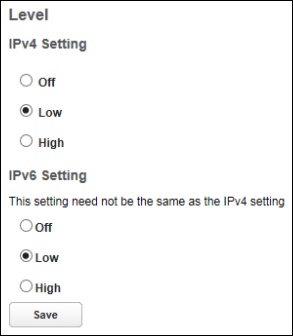
- Configure the following then click Save for the changes to take effect:
- Off: All inbound and outbound traffic to the WAN is allowed.
- Low: All outbound traffic and service exports such as pinholes, are supported. Unsolicited inbound traffic from the WAN will be dropped.
- High:Pinholes and other service exports are disabled.