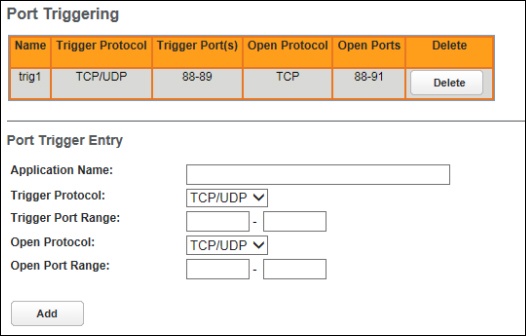
Arris NVG558 Router - Firewall - Port Triggering
Here's how to configure port triggering on your NVG558 router.
A trigger port offers temporary pinholes that are opened in response to particular outbound traffic, under the assumption that an application creates an outbound session X, and requires an inbound session Y to be forwarded through the NAT/Firewall into the LAN.
- Sign in to the Admin WebGUI then clickFirewall.You must be connected to the network to access the admin page.
- ClickPort Triggering.
- Configure the following then clickAdd:
- Application Name: The name of the triggering rule you are creating that is not provided in the Select Application drop-down list.
- Trigger Protocol Applicable protocols: TCP/UDP, TCP, and UDP.
- Trigger Port Range: Enter the lowest port number in the range in the left box and the highest number in the right box. (Apply the same port number in both boxes if not a range.)
- Open Protocol Applicable protocols: TCP/UDP, TCP, and UDP.
- Open Port Range: The port or range of port on the selected protocol which will receive the pin-holed Traffic.