Arris NVG558 Router - LED Status Indicators
Here's info on the LED status indicators for your NVG558 router.
- The Arris router is used for LTE Business Internet and 5G Business Internet (Installed) Solutions.
- Use the status lights on the front of the Arris NVG558 router to determine its status.
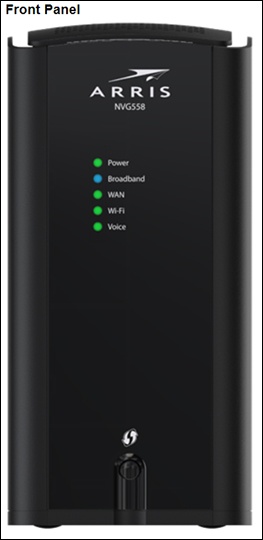
Power
- Green
- The power is on.
- Flashing green
- The Gateway is starting.
- Red
- The Gateway was unable to start.
- Red/Green
- Standard reset in progress.
- Flashing red
- Factory reset in progress
Broadband
- Blue
- The Gateway is connected to the provider network.
- Red
- No IP address or authentication failed.
WAN
- Green (NVG548/568/578)
- WAN connection is active.
- Green (NVG558)
- Cellular WAN connection is within the configured "RSSI good" range.
- Flashing green (all)
- WAN sync in progress.
- Amber (NVG548)
- WAN connection is active, but only one of two bonded pairs is synced.
- Amber (NVG558)
- WAN connection is within the configured "RSSI fair" range.
Wi-Fi
- Green
- Wi-Fi is enabled on either or both radios.
- Slow flashing amber
- WPS data or guest SSID pairing on configured radio (2.4 GHz or 5 GHz). Button was pressed for less than 3 seconds.
- Fast flashing amber
- WPS video SSID pairing on configured radio (2.4 GHz or 5 GHz), if a video SSID is configured. Button was pressed for more than 3 seconds.
- Red
- Wi-Fi network failure.
- Flashing red
- WPS timeout or conflict (session overlap). Returns to the previous state after 30 seconds.
- Off
- Wi-Fi is disabled