Session status messages
Session Status

Due to inactivity, your session will end in approximately 2 minutes. Extend your session by clicking OK below.

Due to inactivity, your session has expired. Please sign in again to continue.

CTL Chromebook NL71CT-L - Power the Device On / Off

2026-10-23 09:34:04.538

CTL Chromebook NL71CT-L - Power the Device On / Off

Here's how to turn your CTL Chromebook NL71CT-L on or off, which can help if its unresponsive, frozen or runs slow.
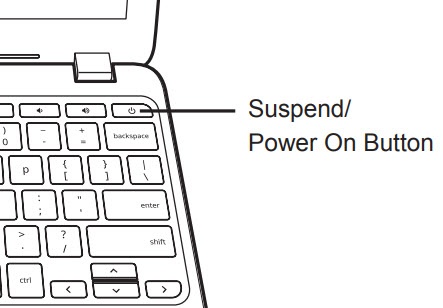
Power on button
  1. Press the
    Power button
    .
    If the device is unresponsive / frozen, press and hold the
    Power button
    for approximately 10 seconds or until the device power cycles.