Nokia 2720 V Flip - Insert or Remove SD / Memory Card
Here's how to insert or remove an SD / memory card for your Nokia 2720 V Flip.
The Nokia 2720 V Flip supports microSD memory cards which can be purchased from any Verizon store or online.
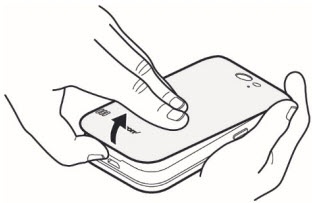
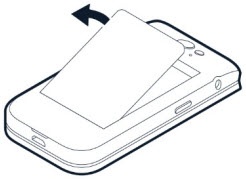
- Place your fingernail in the small slot at the bottom of the phone then lift and remove the cover.
- If the battery is inserted, remove it.
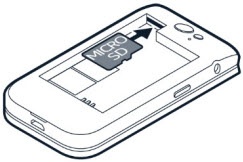
- Do one of the following:
- Insert SD / memory card:Slide the SD / memory card into the card slot (gold contacts facing down).
- Remove SD / memory cardPush the SD / memory card gently with your finger and then release the pressure. The card ejects itself.
- Insert the battery.Make sure the gold contacts line up then press down gently to secure.
- Replace the back cover over on the back of the phone.Press down along the edges to secure.