Session status messages
Session Status

Due to inactivity, your session will end in approximately 2 minutes. Extend your session by clicking OK below.

Due to inactivity, your session has expired. Please sign in again to continue.

Samsung Galaxy Book Go 5G - Adjust Volume

2026-10-04 23:05:42.469

Samsung Galaxy Book Go 5G - Adjust Volume

Here's how to manage volume controls if your Galaxy Book Go 5G doesn't vibrate or make sounds when receiving messages or other notifications.
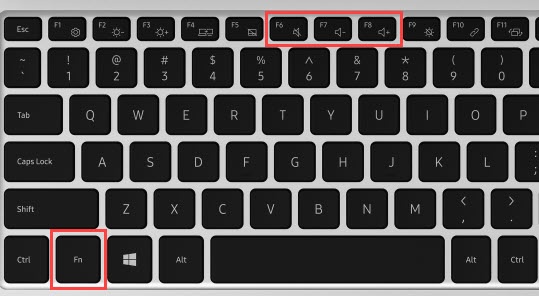
  1. From the keyboard, press and hold the
    Fn key
    .
  2. Press the
    Volume keys
    to increase Increase volume key or decrease Decrease volume key until the desired volume is achieved.
    Press the
    Mute key
    Mute volume key to quickly mute or unmute the volume.
    Fn and volume buttons