Session status messages
Session Status

Due to inactivity, your session will end in approximately 2 minutes. Extend your session by clicking OK below.

Due to inactivity, your session has expired. Please sign in again to continue.

Samsung Galaxy Chromebook Go - View SIM Card Number

2026-10-10 04:24:40.305

Samsung Galaxy Chromebook Go - View SIM Card Number

Here's how to view the SIM card number associated with your Galaxy Chromebook Go.
  1. Navigate:
    Launcher Launcher icon
    >
    Settings
    .
  2. Click
    Mobile Data
    then click
    Verizon
    .
  3. Click
    Advanced
    .
  4. View the ICCID.
You can also remove the SIM card and view the 20-digit SIM card number (with the gold contacts facing away).
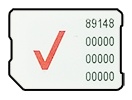
SIM Card