Arlo Go 2 LTE Security Camera - Insert / Remove SIM Card
Here's how to properly insert or remove a SIM card for your Arlo Go 2 security camera.
Instructions on inserting/removing your SIM can help with activation issues/errors.
Don't attempt to insert or remove the SIM card while your Arlo Go is powered on our while outdoors. Doing so may harm the SIM card and/or the device.
- Ensure the camera is disconnected from the power adapter.
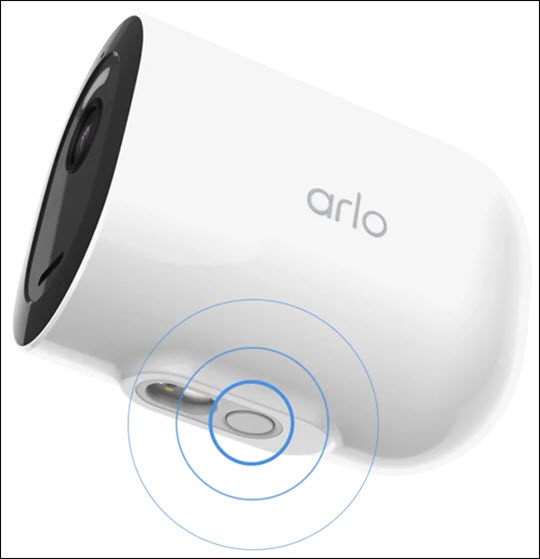
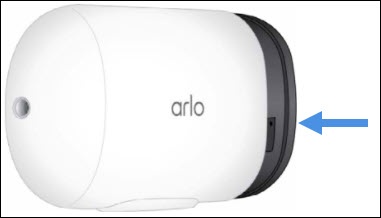
- Release the camera from the protective housing.Press the button on the magnetic charging port until a click is heard and the camera slides out partially.
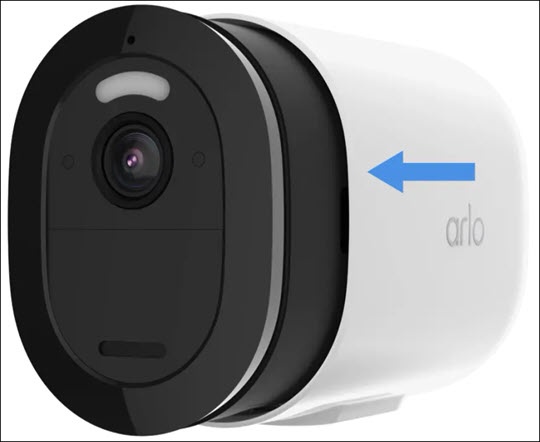
- Utilizing the notches on both sides, pull the camera to remove it from the housing.
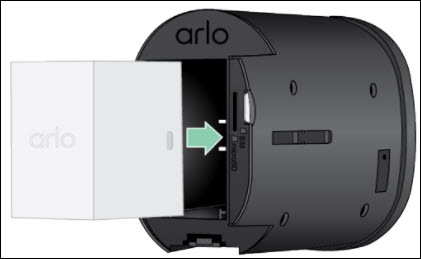
- If present, remove the battery then do one of the following:If necessary, refer to Insert / Remove Battery for assistance.
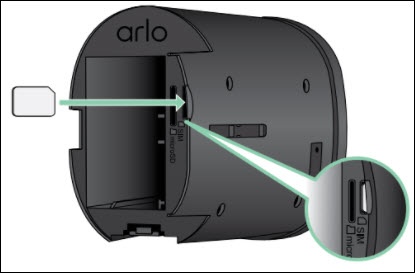
- Insert SIM cardEnsure the card slides into place (gold contacts facing toward the battery, notch on top).
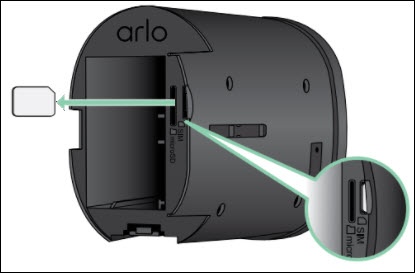
- Remove SIM cardPress the edge of the card until it ejects.
- Re-insert the battery.Ensure that the connectors on the battery align with the connectors on the device.
- Slide the camera back into the protective housing until it clicks.