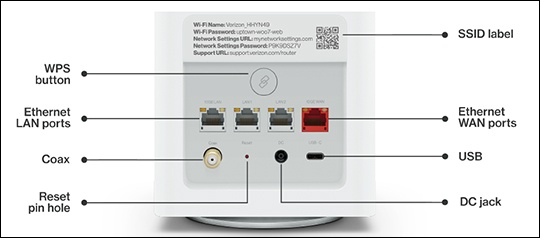
Verizon Router Locate Ports, Connectors and Buttons
Verizon Router
Locate Ports, Connectors and ButtonsReview this info for how to view the location of the various buttons, ports and connectors on your Verizon Router.
Steps
- The rear panel has 6 ports: F-type coax, Ethernet LAN (three), Ethernet WAN, and USB. It also includes a DC power jack and a reset button. Review the following info for more details:
- WPS Button: Allows quick access to the Wi-Fi Protected Setup (WPS) feature and pairing mode.
- Ethernet LAN: Connects devices to your Verizon Router using Ethernet cables to join the local area network (LAN).
- Type-C USB: Provides up to 1000 mA at 5 VDC for attached devices. For example, you could charge a cell phone.
- 10Gbps Ethernet WAN: Connects your Verizon Router to the internet using an Ethernet cable.
- Coax LAN: Connects your router to other MoCA devices using a coaxial cable. The WAN coax port is meant for connection to Verizon devices only. It must not be connected to any exterior or interior coaxial wires not designated for Verizon devices.
- Reset Button: Allows you to reset your router to the factory default settings. To perform a soft reboot, press and hold the button for at least 3 seconds. To reset the router to factory default settings, press and hold the button for at least 10 seconds.
- Power: Connects your Verizon Router to an electrical wall outlet using the supplied power adapter. The included power adapter is for home use only, supporting voltages from 105-125 voltage in DC. Don't use in environments with greater than 125 voltage in AC.