Airspeed Mobile Hotspot - Restore Settings to Factory Defaults
Here's how to factory / hard reset your Airspeed Mobile Hotspot if the screen freezes or call, app, audio or sync issues occur.
Restore Settings to Factory Defaults only if absolutely necessary as it removes all modified settings including Network Name (SSID), Wi-Fi / admin password, etc.
Via Device
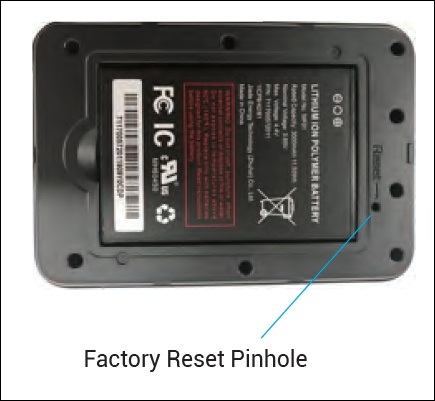
The Master Reset button is in a small hole located on the bottom of the device, underneath the battery cover. Pressing this button returns the device to factory settings.
- Remove the battery cover.Insert your fingers into the battery removal groove at the top edge of the battery cover then lift and remove the battery cover. Set the cover aside.
- With the device powered on, locate the Reset button.
- Press and hold theReset buttonwith a paperclip or use the tip of a pencil or pen.Hold down for approximately 6 seconds.
- Replace the battery cover.Ensure the notches align then press on the cover until it clicks into place and is flat across the entire bottom surface.
Via Admin Web Interface
- Access the Admin Web Interface.
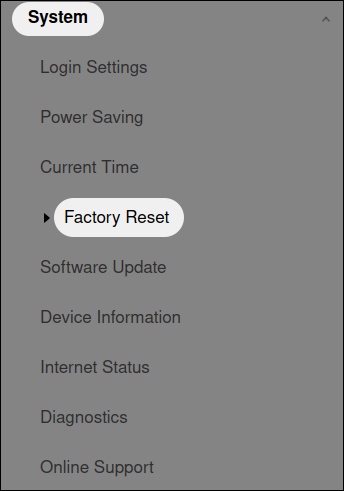
- From the left menu, click .
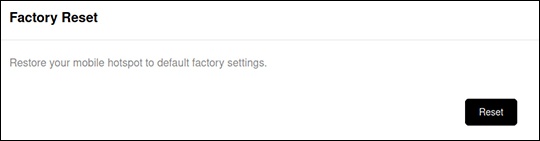
- From the 'Factory Reset' section, clickResetthen follow the prompts.