Airspeed Mobile Hotspot - View Signal Strength
Here's how to view the signal strength indicator (signal bars) on your Airspeed Mobile Hotspot.
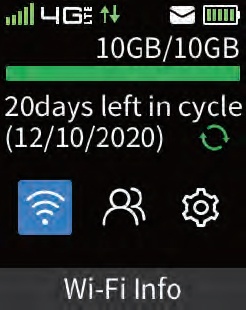
Via Device
- Press thePower button(top right) on your Airspeed Mobile Hotspot to turn on the display.
- View the Network Signal Strength Indicator
(signal bars) located in the upper-left.

Via Admin Web Interface
- Access the Admin Web Interface.
- View the signal bars icon located in the status bar (top right).
