Verizon Orbic Speed - Turn Battery Preservation Mode (BPM) On / Off
Here's how to turn Battery Power Mode (BPM) on or off on your Orbic Speed.
- The Battery Preservation Mode (BPM) feature is an enhancement to preserve the integrity of the battery and prevent overcharging in the case where the charger is connected to your device for an extended period of time.
- When you charge the device continuously for 16 hours it automatically enters BPM and an alert is displayed on the device screen: "Your charger has been connected for an extended period of time. Charging is now limited to preserve the integrity of the battery."
- This message will remain on the screen until you unplug the charger or the device is restarted.
- While in BPM, the battery level is maintained between 50%-60%.
To preserve the integrity of the battery, it is not recommended to modify this setting.
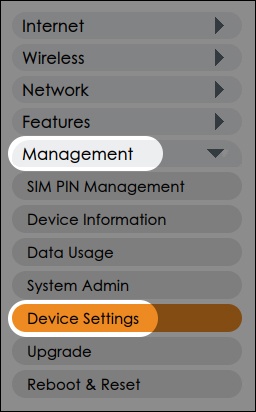
- From the left menu, clickManagementthen clickDevice Settings.
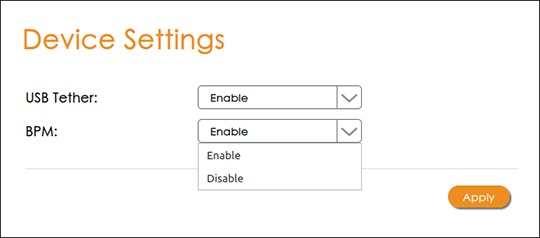
- From the BPM dropdown, choose either 'Enable' or 'Disable' then clickApply.