One Talk W78B IP DECT Cordless Phone Activate / Set Up Device
One Talk W78B IP DECT Cordless Phone
Activate / Set Up DeviceActivate your One Talk W78B IP DECT cordless phone to get started. This ensures you can make calls and connect to your company network.
Before you begin
The One Talk W78HV Cordless phone is used with the One Talk W78B IP DECT base station.
Up to 5 One Talk W78HV Cordless phones can be registered to one One Talk W78B IP DECT base station, and each cordless handset can be registered to 4 different base stations.
Activation requires a valid US address for E911 functionality.
A soft reset is needed on the desk phone when a new endpoint is added to the One Talk MDN.
Steps
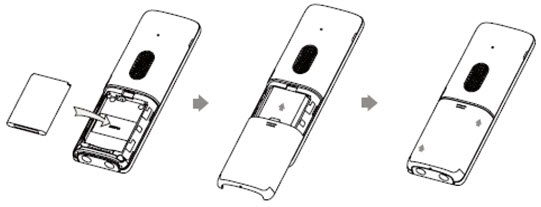
- Insert the battery into the cordless handset and attach the belt clip if preferred.
- Connect the charging cradle and charge the handset.Use the supplied power adapter (5V/0.6A). A third-party power adapter may damage the cordless phone.Check the charging status in the upper-right corner of the display.
- Turn the handset on.
- Set up the base station using either the desktop or wall mount setup option.
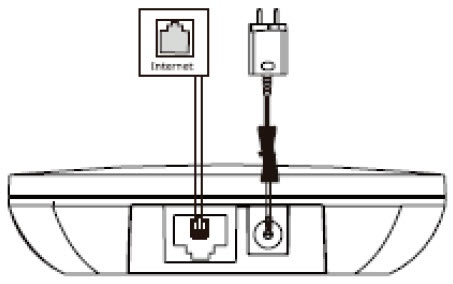
- Connect the base station to the power and network by selecting one of the following options:Contact your IT admin before selecting the power option.
- AC PowerUse the Verizon supplied power adapter (5V/0.6A). A third-party power adapter may damage the base station.
- PoE (Power over Ethernet)Ensure the hub/switch is Power over Ethernet (PoE) compliant.
- Wait for the phone to finish the initialization process.
- After starting up and confirming the 911 address, the phone is ready for use.
- To register the first and additional handsets:Press theReg soft keyon the handset to register quickly or do the following:
- Press and hold thePaging button(looks like a Wi-Fi icon) on the base station until the registration LED flashes. The base station is now in registration mode.If the base station doesn't identify a DECT phone within 90 seconds, registration mode switches off automatically.
- On the W78HV handset, pressOKthen navigate: .The handset begins searching for the base station which is in registration mode.
- PressOKafter the base station is found.
- Enter the base station PIN (default: 0000) then selectDoneto finish registration.After registration, the phone prompts “Handset Subscribed” and “Base NO. (the last 4 characters of the connected Base’s MAC address)”.After the handset is initialized successfully, an icon with the internal handset number and handset name appears on the phone screen.If registration wasn't successful, the handset screen notifies you that the registration failed.
- To de-select handsets:
- On the W78HV handset, pressOKthen navigate: .
- Enter the base station PIN (default: 0000) then pressDoneorOK.The screen displays the handset names that are registered to the same base station. The name of the cordless handset itself is highlighted and followed by a left arrow.
- When prompted, select the option to confirm and de-register the handset.