Verizon Receiver (LV65) Install / Set Up 5G Home - Outdoor Signal Test
Verizon Receiver (LV65)
Install / Set Up 5G Home - Outdoor Signal TestFind the optimal location for your Verizon Receiver (LV65) to ensure you get the strongest 5G signal and fastest speeds.
Before you begin
Don't open boxes until instructed.
Enable Bluetooth® on the device you're connecting to the Verizon Receiver (LV65).
Everything you need is in the box.
Signal test for the Verizon Receiver (LV65) is performed within the My Verizon app for Google™Android™ and Apple® iOS.
Steps
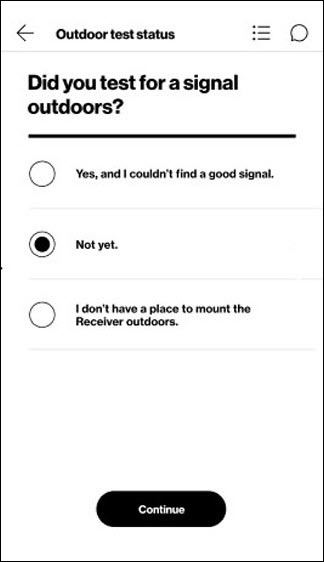
- From the 'Outdoor test status' screen tapNot yet..
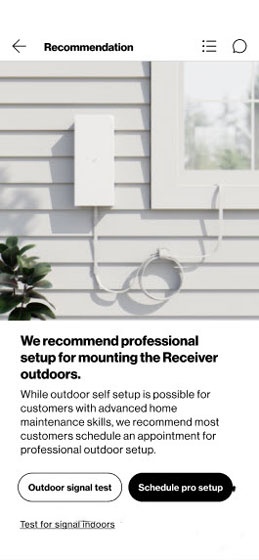
- From the 'Recommendation' screen tapOutdoor signal test.
- Confirm the following then tapContinue:
- You have permission to install equipment outside your home, either on a wall or railing.Don’t test for a signal outdoors if you’re not allowed to mount the equipment there.
- There’s an indoor power outlet nearby that’s not near a water source. (If needed, use the extra Ethernet cable to reach.) Never use an outdoor outlet.The power adapter is for indoor use only. It must be away from water to minimize any risks to you or the Receiver.
- You’re able to route the cable with some slack through a window that will still fully close.Make sure you can close the window on the cable, and there’s enough slack in the cable to hang below the window and the Receiver.The cable adapter can be used with the extra Ethernet cable to reach an indoor power adapter. Watch this video for a demo.
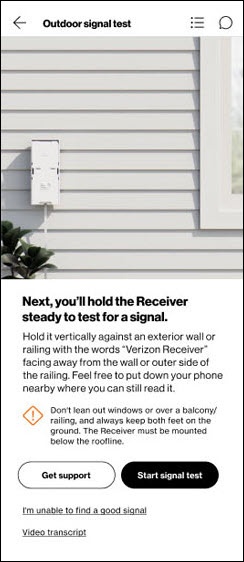
- From the 'Outdoor signal test' screen tapStart signal test.Watch this video for a demo.
- Review these tips to find a good signal:
- The words 'Verizon Receiver' should face out towards the 5G antenna.
- Find the clearest path to the antenna. If at an outdoor wall, hold the Receiver above your head so your body doesn’t block the signal. If at a railing, position the Receiver on the outer side of the railing, so the railing itself doesn’t block the signal.
- The receiver must remain still to determine signal strength.
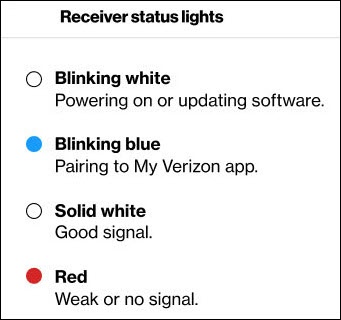
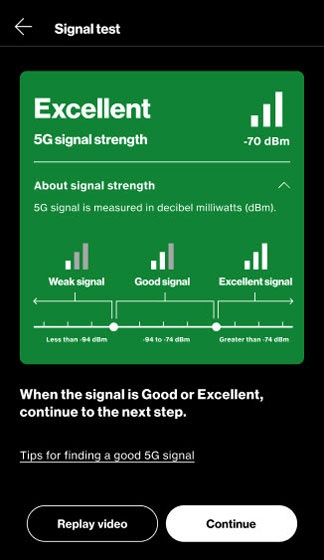
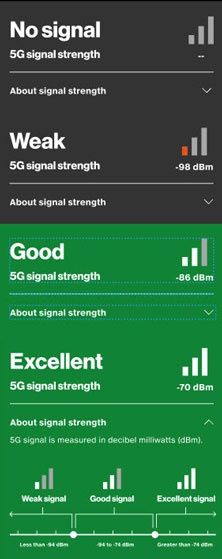
- Once the Receiver LED displays a solid white light and the My Verizon app displays 'Good' or 'Excellent', tapContinue.The continue button won't function until a 'Good' or 'Excellent' signal is acquired.If needed, repeat step 2 from a different window or from a wall on the perimeter of the home.After 10 minutes, an 'It looks like you're having trouble finding a signal' notification displays. TapExplore more optionsthen continue to step 6.
- If you didn't find a good signal complete the following:
- From the 'Indoor test status' screen select 'Yes, and I couldn’t find a good signal.' then tapContinue.
- From the 'Outdoor test status' screen select 'Yes, and I couldn’t find a good signal.' then tapContinue.
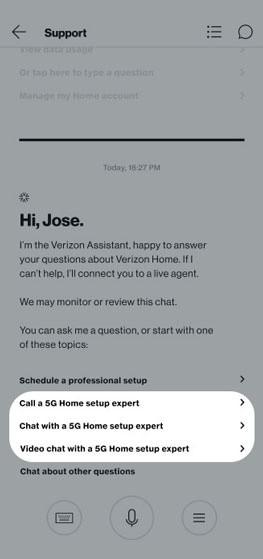
- From the 'Can’t find signal' screen tapGet support.
- Select one of the following:
- Call a 5G Home setup expert
- Chat with a 5G Home setup expert
- Video chat with a 5G Home setup expert
- Mark the location where you found a good signal by pulling a sticker off the receiver and placing it just below where you’ll mount it then tapContinue.Watch this video for a demo.
- Select where the signal was found, choose one of the following then tapContinue: