Razer Edge 5G - Attach / Detach Controllers
Here's how to attach or remove the controllers for your Razer Edge 5G.
Attach Controllers
When attached, the Razer Kishi V2 Pro controllers can be used to charge the device (bottom right controller) or connect a headset (bottom left controller)
- Insert the left edge of the Razer Edge 5G against the inner edge of the left controller.
- Slide the controllers apart, until the device fits between the left and right controller.
- Align the right controller with the USB Type-C charging port then slide inward to connect the controllers.

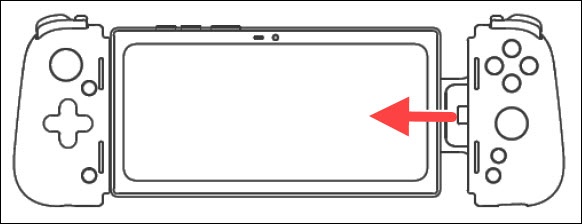
Detach Controllers
- Holding the right controller, slide the device to the left, then remove the right controller from the device's USB Type-C port.
- Once released, lift up on the right edge of the device and remove.
