Wi-Fi Extender (LVSKM1) Factory Reset
Wi-Fi Extender (LVSKM1)
Factory ResetIf your Wi-Fi Extender (LVSKM1) is acting up, a quick factory reset is a great way to troubleshoot and restore it to its original, out-of-the-box settings.
Before you begin
A reset to factory default deletes all changes made to the configuration and connected clients (e.g., Network Name (SSID), Wi-Fi/Admin Password, etc.) need to reconnect.
Steps
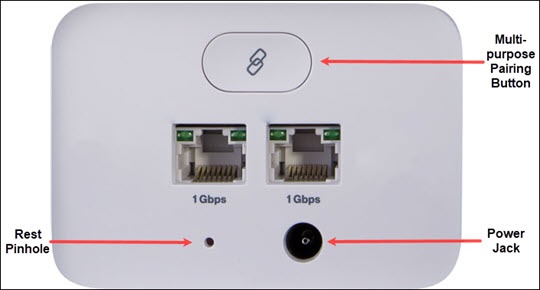
- From the back of the router, locate the Reset pin hole.
- Insert a paper clip into the hole then press and hold theReset Pinhole buttonfor at least 10 seconds with the router powered on.