TCL FLIP 3 - Manage RTT Settings
Here's how to use the real-time text (RTT) functionality on your FLIP 3.
Real-time text (RTT) is text transmitted instantly as it is typed or created. Recipients can immediately read the message while it is being written, without waiting or the need for an additional device.
Change RTT Visibility
- From the main screen, press theOK button.Utilize the 5-way navigation pad to highlight and the OK button to select.
- SelectSettings.
- From the Device tab, selectAccessibility.
- SelectRTT.
- SelectReal Time Text Visibility.
- Highlight a setting then press theOK buttonto choose an option:
- Only during calls
- When placing calls

Make a Call with RTT
- With RTT set to 'When placing calls', do one of the following:
- From the keypad:
- Enter a 10-digit number.
- Press theright soft key
to select
Options. - SelectRTT call.
- From Contacts:
- Press theright soft keyto selectContacts.
- Highlight the contact.
- Press theright soft keyto selectOptions.
- SelectRTT call.
Switch a Call to RTT
- With RTT set to 'Only during calls', place a call.
- Once call is connected, press theright soft keyOptions.
- SelectRTT call.
End an RTT Call
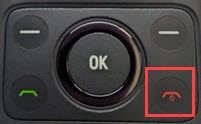
- While on a call, press theEnd Call button.