Orbic JOURNEY PRO / JOURNEY PRO LITE - Insert / Remove SIM Card
Here's how to properly insert or remove a SIM card for your JOURNEY PRO / JOURNEY PRO LITE.
Don't attempt to insert the SIM card while your Orbic® JOURNEY PRO / JOURNEY PRO LITE is powered on. Doing so may harm the SIM card and/or the device.
- Ensure the device is powered off.
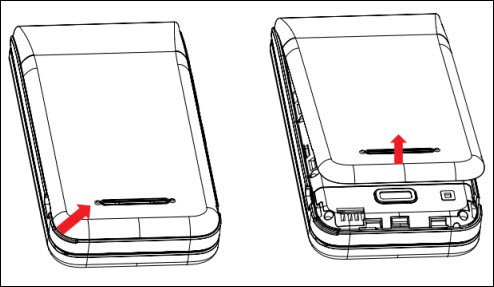
- Remove the battery cover.Insert your fingernail (or a similar tool) into the cutout located on the lower-center of the battery cover to lift and remove the cover.
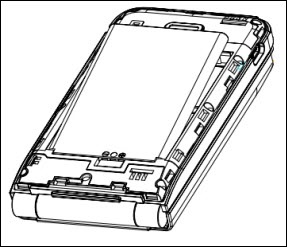
- Use the fingertip cutout at the top of the battery compartment to lift out the battery.
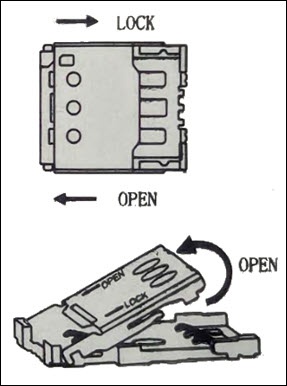
- Slide the SIM card tray left to unlock the tray.
- Do one of the following:
- Insert SIM cardPlace the SIM card into the SIM nano tray with the gold contacts facing down.
- Remove SIM CardPress down on the tab holding the SIM card in place then slide the SIM card out.
- Push the tray down over the slot then lock the tray by sliding right.
- Ensure the gold contacts line up then press down gently to secure.
- Attach the battery cover.Press down along the edges to lock into place.