Samsung Galaxy Watch Ultra - Restart Device
Here's how to restart your Galaxy Watch5 / Galaxy Watch5 Pro if it crashes and resets, freezes or runs slowly.
A restart (soft reset) can resolve issues like continuous resetting, rebooting, device crashing, freezing, won't ring or vibrate, can't make or receive calls, device locks up and screen doesn't respond.
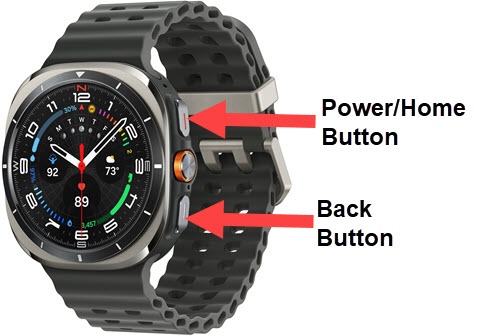
- From the watch screen, press and hold thePower buttonandBack buttonuntil the 'Power off' icon appears (approximately 3 seconds) then release.If the device is unresponsive, simultaneously press and hold thePower buttonandBack buttonuntil the Samsung Galaxy screen appears (approximately 10 seconds) then release..
- Tap thePower off icon.
- Once the device is off, press and hold thePower buttonuntil the Samsung Galaxy Watch Ultra logo appears, then release.Allow up to 30 seconds for the reset to complete.If your device won't power back on, partially charge the device then retry.