5G Home Modem Hardware Overview
5G Home Modem
Hardware OverviewGet to know your 5G Home Modem hardware and LED indicators to ensure your home internet is always running smoothly.
Before you begin
The USB PD Type C power port requires a USB PD 3.1 EPR 54V compatible power supply to support reverse power feed functionality.
Steps
- Review the following info:
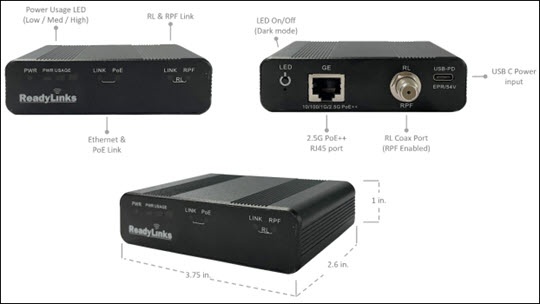
- GE port: Standard 10/100/1G/2.5G PoE++ Ethernet interface for LAN connectivity.
- RL port: Ethernet over coax, reverse power feed compatible, modem port.
- USB PD: Type-C port for local power for the device.
- LED On/Off: Button to enable or disable (“dark mode”) the LEDs on the device.
- Reset: Button (below LED button) to factory reset the configurations on the device.
LED StatusFunctionLED StatusMeaningPWROffThe device is powered offBlinkingThe device is booting upGreenThe device is powered onUSAGEWhiteThe device is using less than 33% total power capacity.White + GreenThe device is using between 33% and 66% total power capacity.White + Green + OrangeThe device is using more than 66% total power capacity.LINK (GE)GreenThe Ethernet interface is plugged into an active Ethernet port.Green (Blinking)Traffic is passing on the Ethernet port.OffThe Ethernet port is unplugged or plugged into an inactive Ethernet port.PoEGreenThe Ethernet port is connected to a PoE device and supplying power.OffThe Ethernet port is not connected to a PoE device.LINK (RL)GreenThe device has established a data link on the coax port.Green (Blinking)The device is connected to another modem and is authenticating.OffThe port is disconnected or is not connected to another modem.RPFGreenThe device is providing reverse power to the connected modem.OffThe port is disconnected or is not connected to a reverse power compatible modem.