All Access Home Internet Modem Hardware Overview (Trial)
All Access Home Internet Modem
Hardware Overview (Trial)Easily check the status of your home internet. Understand your All Access Home Internet Modem hardware features and learn what each LED light indicates for smooth troubleshooting.
Steps
- Review the following info:
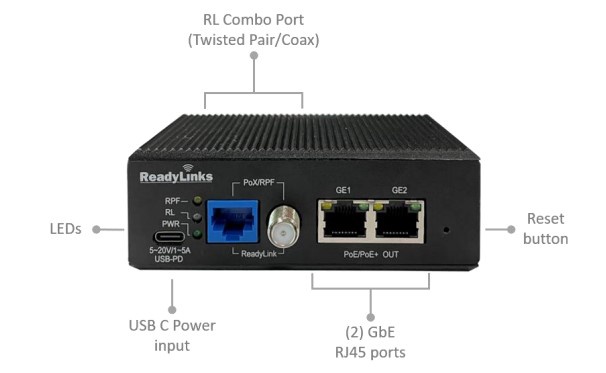
- ReadyLink Combo port (RJ45/F): The Ethernet over coax or twisted pair ReadyLink combo port. Supports PoX (input power) and RPF (reverse power).
- Ethernet: Standard Gigabit Ethernet interface with PoE/PoE+ functionality.
- Reset: The reset button can be used to factory reset the device.
- USB Type C: Input power port for USB-PD power supplies.
- The USB Type C power port on the IPC-2TCP-RPF accepts a wide range of voltage. If you are planning to use the reverse power function, ensure the power supply can supply enough power.
- Review the following chart to determine what the various LED status indicators mean:LED StatusFunctionLED StatusMeaningPWROffThe device is powered off.GreenThe device is powered on.RPFOrangeThe IPC is providing reverse power.BlinkingThe IPC is failing to provide reverse power. Check out the cabling instructions for some troubleshooting tips.OffThe IPC is not providing reverse power.Ethernet (GE)Yellow10 MB link.Green1 GB link.OffNo link.ReadyLink Port (RL)GreenA data link has been established.BlinkingThere is an unstable data link.