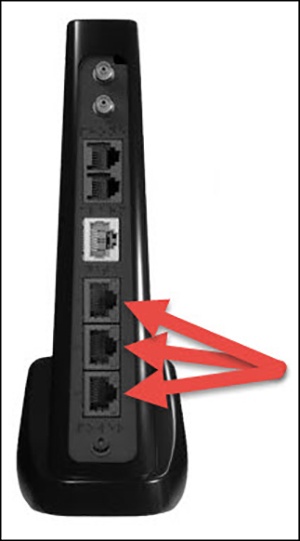
Verizon LTE Internet and Home Phone - Wired Connection
Here's how to complete a wired connection on your Verizon LTE Internet and Home Phone.
The former name of this device is the Verizon 4G LTE Broadband Router with Voice.
- Plug one end of the Ethernet cable into any of the Ethernet ports on the computer.
- Plug the other end of the Ethernet cable into any one of the three Ethernet ports (just above the power port) on the back of the router.
- If necessary, power on the router and/or computer.
- Ensure the LAN Ports LED (in front of the router) is solid or blinking blue or red.For assistance with locating the LAN Ports LED, refer to the LED indicators.If testing fails, try replacing your ethernet cable and attempt to test the connection again.