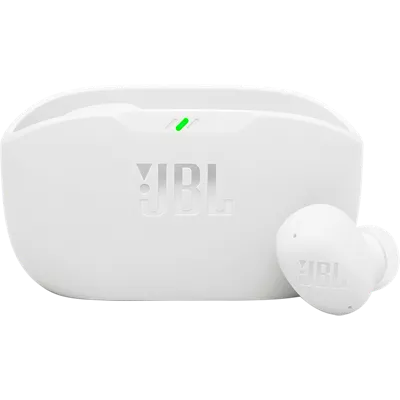
JBL Vibe Buds 2 True Wireless Noise Cancelling Earbuds
¹With ANC off. Battery life and charge cycles vary with use, settings, and other factors; actual results will vary.
Reviews
3.5
47 reviews
86% of reviewers recommend this product.
Disappointed
DMcV . 11 days ago
Customer Support - 11 days ago
Thanks for your feedback. It's possible that the earbud is not charging, and charging issues are frequently caused by foreign matter on the metal charging contacts. This can include sweat, grease, dust, etc. You may click on the link below for detailed online instructions on how to clean the contact points of the earbuds. If the issue remains, please contact us for further assistance. Cleaning instructions: https://bit.ly/3S4bOkQ Contact us here: https://support.jbl.com/us/en/#contactjbl.com Originally posted on jbl.com
Easy Listening
GPM2025 . 1 month ago
jbl.com Originally posted on jbl.com
Features
- Active Noise Cancelling with Smart Ambient
- 4 Mics for crisp, clear calls
- 40 Total hours of playback time, plus speed charging¹
- JBL Pure Bass sound
- Water and dust resistant
- JBL Headphones app
- Multi-point connection
- Seamless Bluetooth® pairing
Specs
- Dimensions: 1.05 x 2.71 x 1.45 in.
- Weight: 15.52 oz.
SKU#
SKU#
JBLVBUDS2WHTAM
What's in the box
- JBL Vibe Buds 2 True Wireless Noise Cancelling Earbuds
- Type-C USB charging cable
- 3 sizes of ear tips
- Charging case
- Product QSG
- Safety sheet
- Warranty
- Warning card
JBL Vibe Buds 2 True Wireless Noise Cancelling Earbuds Reviews
3.5
47 reviews
86% of reviewers recommend this product.
Disappointed
DMcV . 11 days ago
Customer Support - 11 days ago
Thanks for your feedback. It's possible that the earbud is not charging, and charging issues are frequently caused by foreign matter on the metal charging contacts. This can include sweat, grease, dust, etc. You may click on the link below for detailed online instructions on how to clean the contact points of the earbuds. If the issue remains, please contact us for further assistance. Cleaning instructions: https://bit.ly/3S4bOkQ Contact us here: https://support.jbl.com/us/en/#contactjbl.com Originally posted on jbl.com
Easy Listening
GPM2025 . 1 month ago
jbl.com Originally posted on jbl.com
Great sound!
Mom68 . 1 month ago
jbl.com Originally posted on jbl.com
Great sound and fit
Psychobill768 . 1 month ago
jbl.com Originally posted on jbl.com
Ok, but not great
JdotP . 1 month ago
Customer Support - 1 month ago
Thanks for your feedback. Our JBL Vibe Buds 2 have a volume control that you can set up using our JBL Headphones app. We recommend downloading our app to modify the tap button settings.jbl.com Originally posted on jbl.com
Incredibly Frustrating
Music_Listener . 1 month ago
Customer Support - 1 month ago
Thanks for bringing this to our attention. Whenever you take the earbuds out, you might be tapping the buttons unintentionally, which is why it keeps switching the features. You can turn off the tap buttons through the JBL Headphones app. Regarding the charging issue with the earbuds, we recommend cleaning the charging pins of both the earbuds and the case using a cotton swab and alcohol. Please make sure to dry them before putting them back in the case. If you need more help, please contact us directly at: https://support.jbl.com/us/en/#contactjbl.com Originally posted on jbl.com
No top, no instructions
Had high hopes . 1 month ago
Customer Support - 1 month ago
Thanks for your feedback. We would like to clarify that our JBL Vibe Buds 2 charging case is intentionally designed without a lid. As for the user manual, we value your input, and we'll make sure to forward your feedback to the appropriate team.jbl.com Originally posted on jbl.com
Sound is okay for the price.
Greg of NC . 1 month ago
Customer Support - 1 month ago
Thanks for bringing this to our attention. We'd like to work with you directly to check your out-of-warranty options. Please contact us directly at: https://support.jbl.com/us/en/#contactjbl.com Originally posted on jbl.com
Love color & sound is amazing
prettisho39 . 1 month ago
jbl.com Originally posted on jbl.com
Not worth the hassle, uncomfortable
Stella555555 . 1 month ago
Customer Support - 1 month ago
We'd like to work with you directly to address the issues you're experiencing with your unit. Please contact our customer support team via this link: https://support.jbl.com/us/en/#contactjbl.com Originally posted on jbl.com
JBL Vibe Buds 2 True Wireless Noise Cancelling Earbuds FAQs
sharxalot . Dec 17, 2025
can you use them one in at a time?
Thanks for your question. Yes, our earbuds, like the JBL Vibe Buds 2, can be used one at a time.
Bobby shhshs . Nov 8, 2025
Does it have blue light indicators?
Thanks for your question. Yes, our JBL Vibe Buds 2 have LED indicators on the earbuds, and they show a blue light when they’re in Bluetooth pairing or connected mode.
marginnati . Sep 17, 2025
I can't put apps on my little mp3 player. Can I still pair it to the Vibe Buds 2?
Thanks for your question. If your MP3 player has Bluetooth capability, you can pair it to our JBL Vibe Buds 2 without using the JBL Headphones app.
Jocelyn . May 6, 2025
Is compatible with iPhone 14?
Chad . Apr 24, 2025
are these compatible with Samsung s24 plus
chad . Apr 24, 2025
are these compatible with the samsung s24+
Yes, these earbuds will work with the Samsung S24+. -Sara
Morgan . Apr 14, 2025
Are these compatible with the samsung z flip phone 6? Uh Yunj
Yes, they're compatible! -Cait