Verizon LTE Internet and Home Phone - Check Configuration for Fax Services / Home Security Systems
Here's how to send faxes, connect your home security system and troubleshoot configuration issues for your Verizon LTE Internet and Home Phone.
View this info if you want to send and receive faxes with your Verizon LTE Internet and Home Phone or connect your home's security system to it.
- The Verizon LTE Internet and Home Phone supports:
- group 3 fax machines used in most homes and businesses.
- home security systems using Contact ID (DC-05) protocol.
- If unable to use fax services, complete the following:
- Ensure you can make and receive standard phone calls.
- Power the device off and back on again.
- Verify the Error Correction Mode (ECM) setting on your fax machine is turned off.
- Lower the speed on your fax machine to a baud rate of 9600.
- The former name of this device is the Verizon 4G LTE Broadband Router with Voice.
- Verify you have the latest software version.
- Ensure you have the 4G Voice feature add-on.
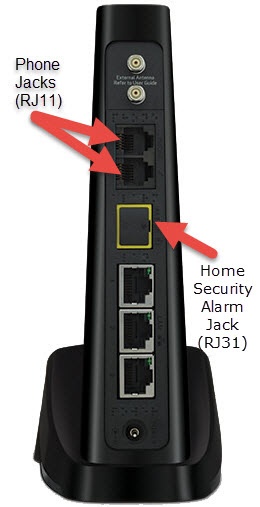
- Plug in the desired hardware (i.e., fax machine or home security system).For setup and advanced troubleshooting, contact the equipment manufacturer as Verizon doesn't support third-party fax machines or security systems.
- Verify the fax machine is plugged into one of the standard phone jacks (RJ11) on the back of the device.Don't connect phone, fax or or any other devices to the yellow port. Doing so may disable the phone.
- Verify HD Voice is enabled:
- From the admin page (configuration console):
- ClickSettings.
- Click theVoice tab.
- Verify there is a check in the box next to 'Advanced Calling features.'
- From the device LED:
- Navigate to 'Voice Signal' menu option.Use the left and right arrows to navigate and the check mark to select.
- Verify 'VoLTE' is listed just below the menu heading (Voice Signal).You are now set up to fax.