Arlo Go - Insert or Remove SD / Memory Card
Here's how to insert or remove a SD / memory card for your Arlo Go camera.
- The Arlo Go is device supports a microSD memory card (SDHC or SDXC only) with up to 32 GB capacity, file format FAT32.For best performance, class 4 or higher is recommended.
- Memory cards can be purchased from any Verizon store or online.
- Ensure the camera is disconnected from the power adapter.
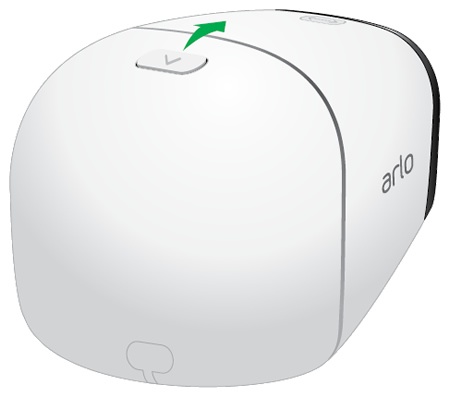
- Open the battery door.Press and hold the latch (located on the top edge) then rotate the door down.
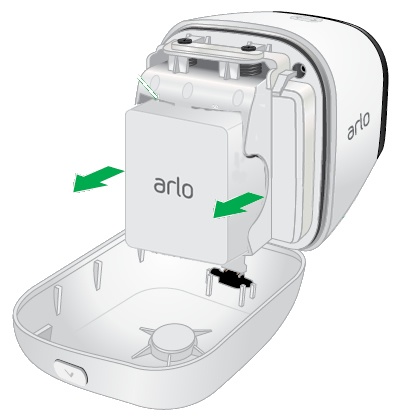
- If present, remove the battery as shown.Utilizing the notches on both sides, pull to remove.
- Do one of the following:
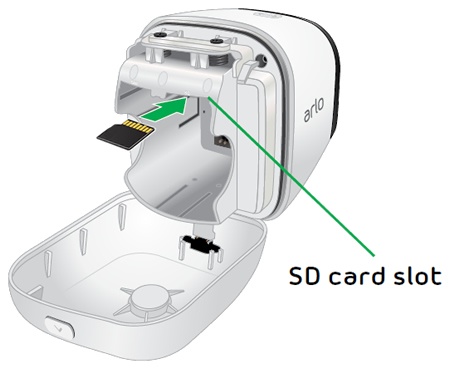
- Insert SD / memory cardInsert the card as shown (gold contacts facing up).
- Remove SD / memory cardIf necessary, press in on the card to unlock it.
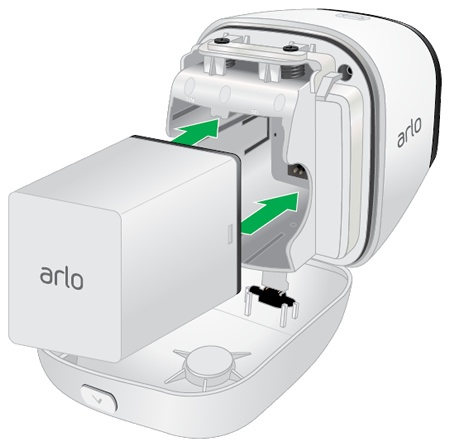
- If applicable, insert the battery as shown.Ensure the connectors on the battery align with the connectors on the device.
- Close the battery door.Rotate the door up and ensure it locks into place.