Wired Connection - Wireless Home Phone T2000
Here's how to set up a wired connection on your Wireless Home Phone T2000.
Electrical equipment can cause interference with Home Phone Connect. Avoid placing Home Phone Connect near other electrical equipment such as refrigerator, television and/or microwave oven.
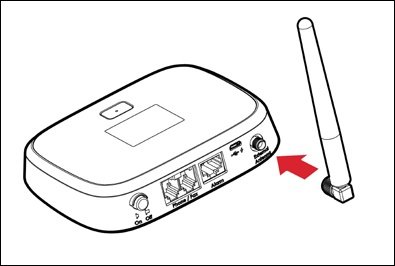
- If needed, attach the antenna.Antenna sold separately and can be purchased from any Verizon Wireless retail store or at the online store.Wireless Home Phone T2000 works fine without it in a normal environment. You can choose to buy the external antenna if you are planning to put this device where the signal might be weak like in the basement.
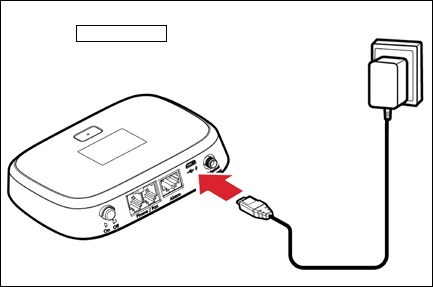
- Connect the power adapter to the device then plug it into an AC power outlet.
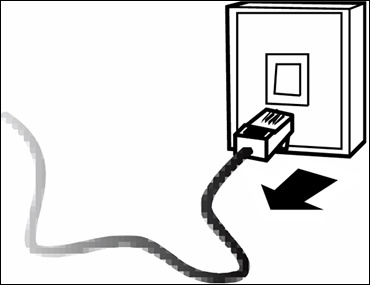
- Disconnect the home telephone from the wall jack.
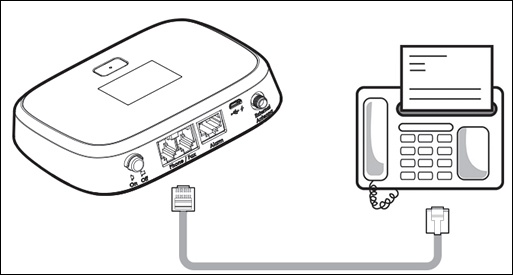
- Connect the home telephone to the device.Don't plug the Home Phone Connect into the telephone wall jack.
- Press thePower button(located at the back of the unit) to turn on the Wireless Home Phone.The power indicator turns blue when device is turned on.
- Place a call to start using the service.Ensure at least one of the signal strength indicator bars
is lit up. If no bars are lit, move the Wireless Home Phone to a location that receives a signal.
You may need to use the three-digit area code when dialing local and long distance numbers.