Samsung Galaxy Watch - Restart / Soft Reset (Frozen /Unresponsive Screen)
Here's how to restart your Galaxy Watch if it is unresponsive, frozen or won't power on or off.
- From your Android™ smartphone or Apple® iPhone® , ensure your Galaxy Watch software is up to date as the steps below apply to the most recent version.
- This watch has a non-removable battery. This process can be used to simulate a 'battery pull' when the watch is unresponsive, frozen, or doesn't power on.
- In most cases, a soft reset won't affect data on the watch, unless the battery is very low.
Press and hold the 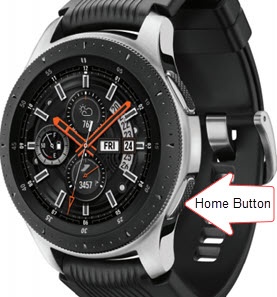
Power button
for approximately 7 seconds or until the watch power cycles.