Insert or Remove SD / Memory Card - HP Envy X2
Here's how to insert or remove an SD / memory card for your HP Envy X2.
The HP Envy X2 supports microSD memory cards which can be purchased from any Verizon store or online.
- Ensure the device is powered off.
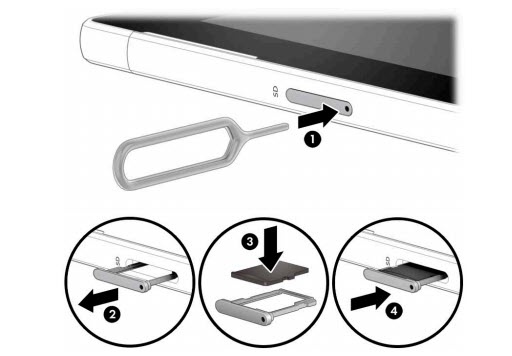
- Position the computer display side up.Utilize the card removal tool (or paperclip) to unlock the tray by inserting it into the provided slot (figure 1) then remove the tray (figure 2).
- Do one of the following:
- Insert SD / memory cardWith the gold contacts facing down, insert the SD / Memory Card into the tray then ensure that the card fits into place.
- Remove SD / memory card
- Insert the SD / Memory Card tray.Press in on the tray to lock it into place.